
Your image becomes your professional identity.
Share and let people understand who your are

Give your customers Professional Access

SphereCard provides access across platforms
Create your opportunity by being accessible
Overview
Everything starts with your image. SphereCard transforms your professional identity into a shareable access point people can quickly understand, communicate with, and confidently share—connecting your website, services, and expertise wherever opportunity happens.
Getting Started with Your SphereCard
Welcome to your SphereCard.
Everything starts with your image. As you complete your SphereCard, your public information comes together as a professional identity people can quickly understand, communicate with, and confidently share.
This guided walkthrough introduces the dashboard and shows how each section works together to build your Interactive Business Identity (IBI). You'll learn how to organize your information, present your services, connect your website, communicate with customers, and create a professional identity that's ready whenever opportunity happens.
Your website remains the place where people can explore your business in depth. SphereCard gives them a clear, actionable way to reach you, interact with you, and confidently share your professional identity with others.
The Resources section lets you add links such as Visit Our Website, Learn More, or My Website, making it easy for people to continue exploring your business.
Once your setup is complete, your SphereCard is available through virtually any modern web browser and across Android, Apple, and Amazon Fire devices. For the most convenient sharing experience, we recommend using the mobile app, while the online version provides the same professional identity experience from virtually anywhere.
If you need assistance at any point, select Customer Support in the Resources section. Our team is happy to answer questions or complete a do-it-for-you setup to ensure your SphereCard represents you with clarity and confidence.
Begin Here
Start with the first video below to become familiar with your dashboard and learn how your professional identity comes together.
After you've completed the first video, continue through the remaining videos in order. Each one builds on the previous lesson, showing how every section works together to present your identity clearly, communicate your value, and make it easy for people to access, understand, and share your professionalism.
By the final video, you'll understand how your SphereCard becomes your Interactive Business Identity (IBI)—ready to represent you 24 hours a day, wherever opportunity happens.
Learn how each widget works together to present your identity clearly and consistently.
This section walks you through the optional widgets, so you can see how your message, services, or story can take shape in a way that feels unmistakably yours.
See how to refine the details—organizing your information so people immediately understand who you are and what you offer. This next video focuses on the many ways you can share your SphereCard, so your identity is easy for people to access wherever they meet you.
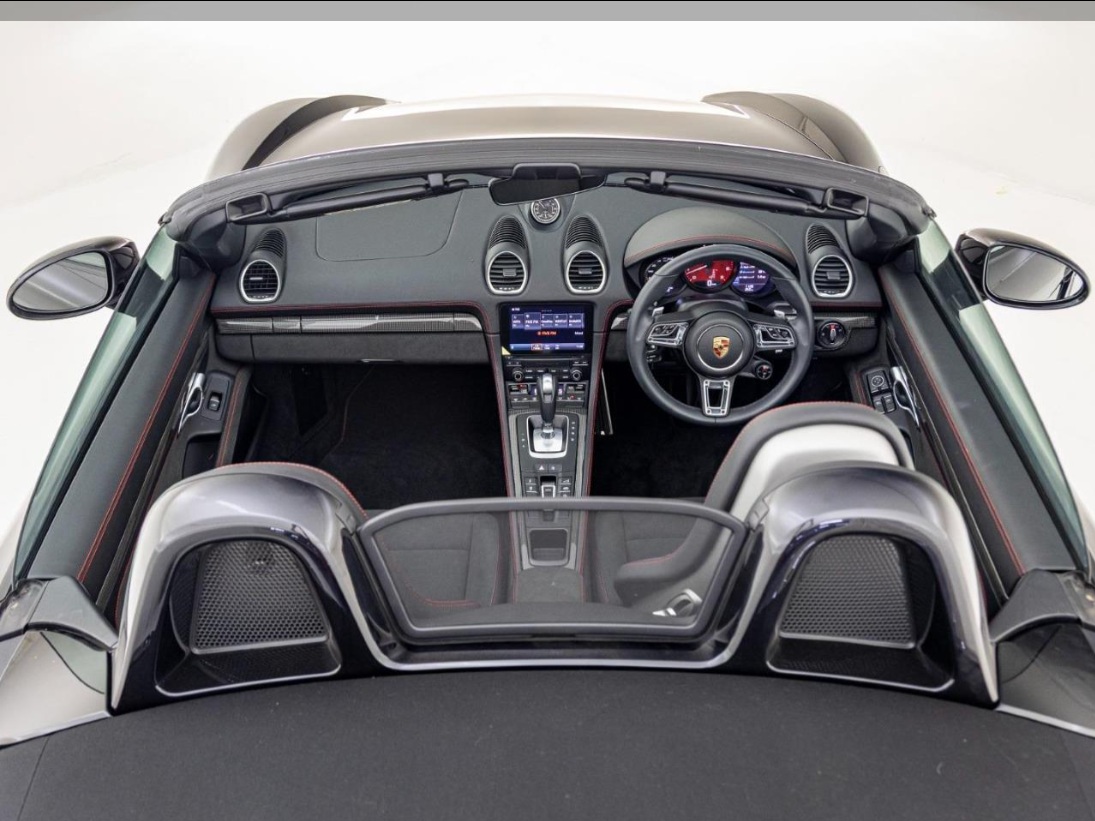
SphereCard Setup Example: 2023 Porsche 718 Boxster
-
6

-
6

-
6

-
6

-
6
-
6

book an appointment
Feedback
Keywords
Professionals
Business Owners
Freelancers
Lawyers
Job Seekers
Real Estate Agents
Entreprenuers
Coaches
privacy policy Powered by Interactive Business Identity (IBI)

About
Your website provides depth, but people need clarity first. SphereCard organizes your public information into an Interactive Business Identity (IBI) that helps people understand who you are, what you do, and how to reach you in minutes. Communicate through secure messaging, voice and video calls, screen sharing, appointments, and shareable professional access—all from one identity that works across web browsers, Android, Apple, and Amazon Fire devices.


Company Details

Sphere Card LLC
- 42, Broadway
- New York, 10004, United States
- Office: +1 (212) 901-4140
Service areas
Worldwide
Addis Ababa, Ethiopia
Atlanta, GA, USA
Seattle, WA, USA
Philadelphia, PA, USA
Dallas, TX, USA
Accra, Ghana
Johannesburg, South Africa
Nairobi, Kenya
London, UK
Cannington, Ontario, Canada
Calabar, Nigeria
